The Agent State by Time for Queue monitor is a Contact Center Client real-time monitor designed specifically for contact centers using Agent Group Presence functionality. However, the Agent State by Time for Queue monitor is available for all media server types.
The Agent State by Time for Queue monitor is accessed from the Real Time tab in Contact Center Client and displays all agents configured in a specific queue and agents who are on ACD calls, idle, on Non ACD calls, unavailable, logged on to the system (but not present in the queue being monitored), and logged off. (See the following figure).
- Virtual queue groups are shown under the Virtual queue groups section of the Agent State by Time for Queue monitor. Any Agent State by Time for Queue monitors that are monitoring virtual queues are marked in the title as (virtual).
- The Agent State by Time for Queue monitor does not support viewing Ring Groups.
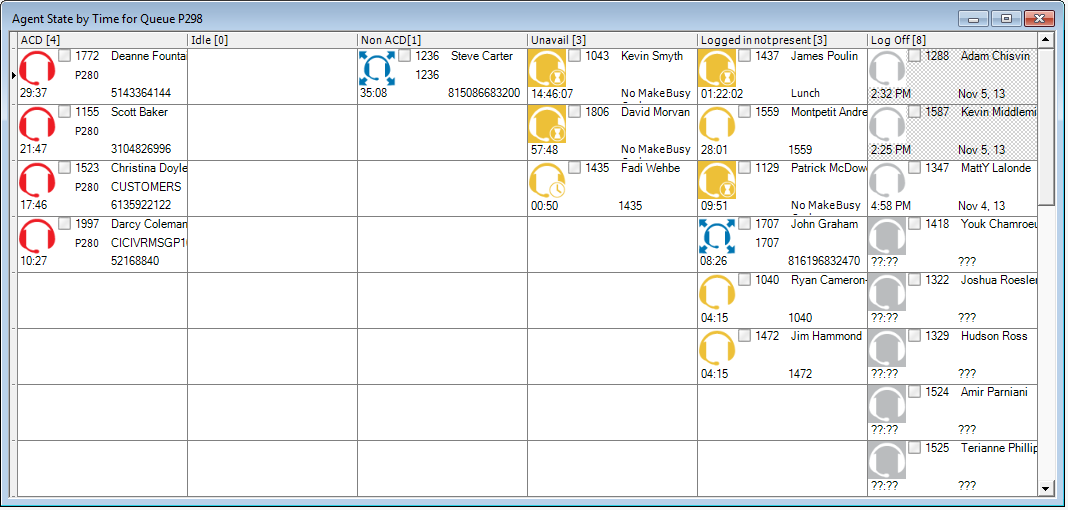
The following table lists the Agent State by Time and Employee State by Time column headings and their associated agent states.
| Category | Associated agent states |
|---|---|
| ACD | includes agents in ACD and agents in ACD Hold |
| Idle |
includes agents in the Idle state For Voice, Available includes agents whose devices are off hook or who have Non ACD calls ringing. These agents will not be offered ACD calls. |
| Non ACD | includes agents in Non ACD, in Non ACD Hold, Outbound agents, and Outbound Hold agents |
| Unavailable | includes agents in Do Not Disturb, Make Busy, and Work Timer, and Reseize Timer |
| Logged in not present | includes agents logged in but not present to any of their agent groups, and agents not present to a media type across all groups |
| Log Off | includes agents in the Logged Off, Unknown, and Offline (Ignite, WEB) states |
- In the Contact Center Client ribbon, click the Real Time tab.
- In the State by Time column on the ribbon, click Agent by Queue.
- Select the queues to monitor. You can optionally sort members in either ascending or descending order.
- Click OK.