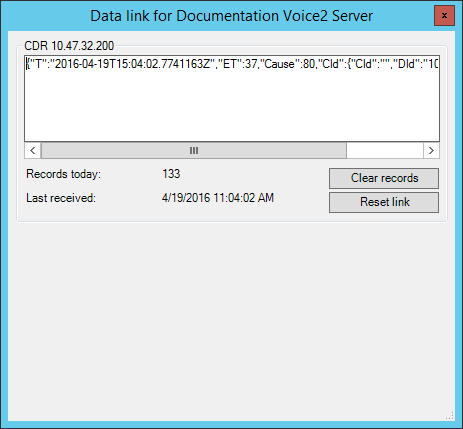
MiContact Center Business uses specific CTI settings for certain types of SIP media servers. You must select your corresponding SIP media server type and input the address and port of the server where your CSTA service resides. After configuring your CTI settings, you can verify that your SIP media servers are receiving interaction data using the Data Link button.
- Click YourSite > Media servers.
- Select a SIP media server and click the General tab.
- After Server Type, select the server type from the drop-down list.
- After CTI Server, type the TCP address to your BluStar server in the following format: tcp://<IP address>:5007.
Note:
5007 is the default 'Client socket tcp port' used when installing BluStar. Check the BluStar Server configuration to determine whether this default has changed.
- Click Save.
Verifying media servers are receiving interaction data
- SMDR /ACD
SMDR/ACD SMDR displays SMDR/ACD SMDR records as they arrive from the telephone system.
- Records today
Records today displays the total number of records received by MiContact Center Data Collection Service for the day that were valid interaction data records.
- Last received
Last received displays the date and time MiContact Center Data Collection Service received the interaction data record last sent.
- Clear records
The Clear records button clears the records displayed on the Data Link window.
- Reset link
The Reset link button resets the data link from the gateway to MiContact Center Data Collection Service when the data stream shows no data is streaming. If you attempt to reset the link and data does not start streaming, check your cabling connections from the gateway to TCP/IP sockets.
- Reset SMDR link/Reset ACD link
The Reset SMDR link/Reset ACD link button resets the SMDR/ACD SMDR data link from the telephone system to MiContact Center Data Collection Service when the SMDR data stream/ACD data stream shows no data is streaming. If you attempt to reset the link and data does not start streaming, check your cabling connections from the telephone system to the TCP/IP sockets.
- In YourSite Explorer, select a SIP3300 ICP media server and click the Data Link button in the Tools tab of the ribbon to access the Data Link window.
- If no data is streaming, click the Reset link button.
-
For an example of the Data Link user interface, see the following figure.
Figure 1. Data Link window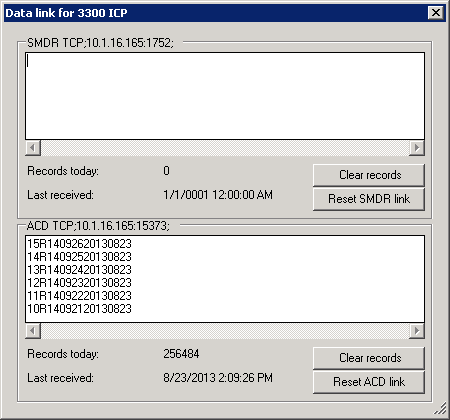 Figure 2. Data Link window