Configure SIP Session Timer
Pre-requisites to enable the SIP Session Timer on AWV:
- PBX with SIP Session Timer Capability
- PBX with configurable refresher option – It is required to make AWV work as a refresher
- It is required to set the Session Timer to 180 seconds
Configuration on MiVoice Business:
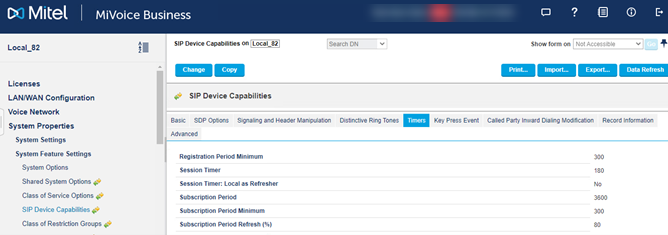
To enable Session Timer, go to System Administration Tool > System Properties > System Feature Settings > SIP Device Capabilities > Timers .
Here, set the value for the Session Time field as 180 (seconds)
Note: Make sure to set the Session Timer: Local as Refresher field as No.
↑