Application Environment
This topic describes the various components of the application environment.
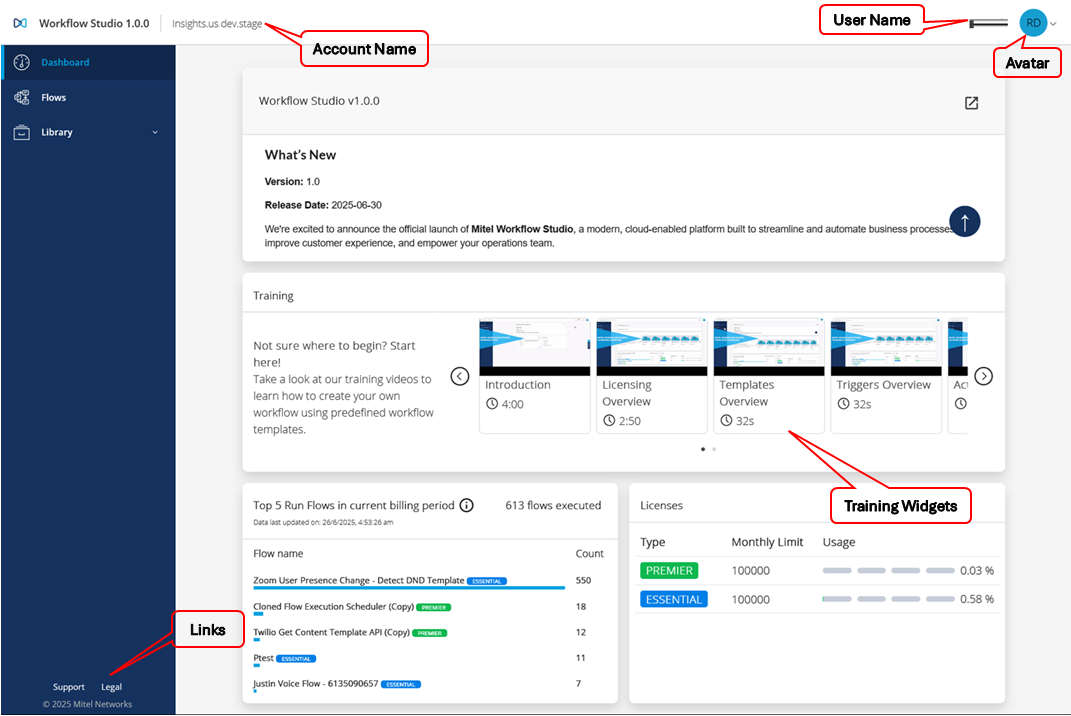
The following table describes the user interface elements on the home page.
| UI Elements | Description |
|---|---|
|
User Name |
Displays the name of the logged-in user as in the Mitel Administration portal. |
|
Avatar |
Displays a short representation or image of the logged-in user. |
|
Account Name |
Displays the customer account name added by the Mitel Partner. |
|
Dashboard |
Displays the widgets to view the training videos for predefined templates and a list of the top five run flows in the current billing period. |
|
Flows |
Displays the list of workflows accessible to the user and allows the user to create, edit, import, clone, and delete workflows. |
|
Library |
Displays the list of available actions, triggers, templates, and integrations for the account. |
|
Links |
The following links appear at the bottom of Workflow Studio:
|