Expanding/Collapsing Workflow
You can expand or collapse the nodes in the Workflow canvas. By default, the flow/action will be opened in collapsed mode.
Figure 1. Workflow Canvas
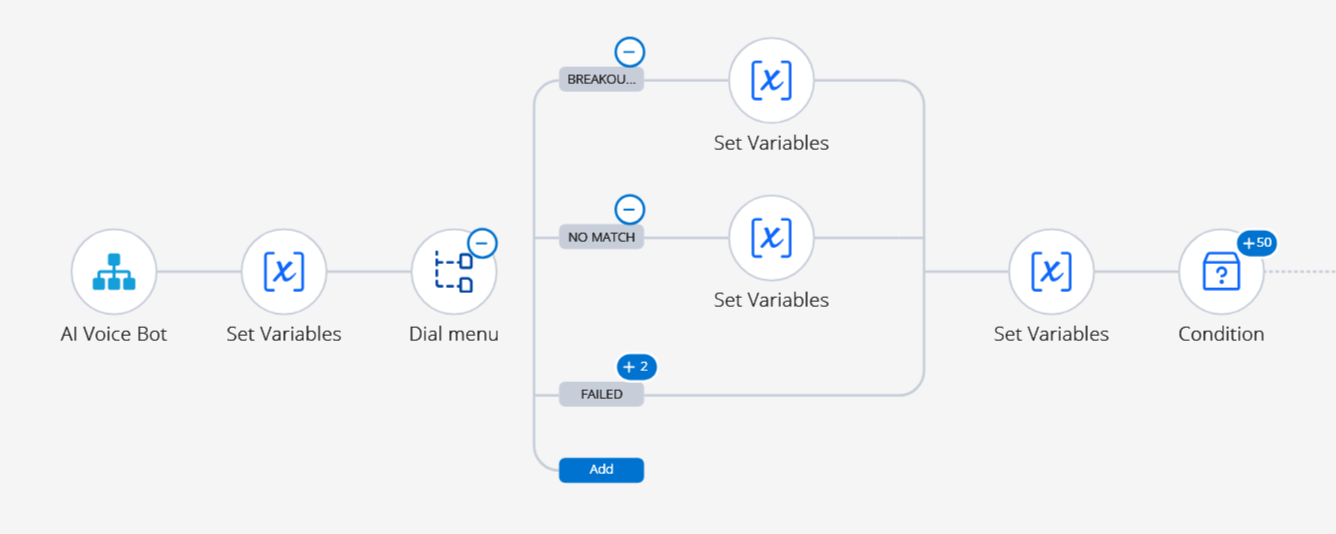
The following actions can be performed in Workflow Canvas:
| Symbol/Icon | Action | Description |
|---|---|---|
|
Expand All |
Click this icon at the top of the page to expand all the child nodes in the flow/action. |
|
Collapse All |
Click this icon at the top of the page to collapse all the nodes in the flow/action and indicate the number of child nodes in the superscript number. |
|
Expand Node |
Click the superscript number to expand all the child nodes for the selected node. |
|
Collapse Node |
Click the minus symbol to collapse all the child nodes and indicate the number of child nodes in the superscript number. |



↑