Creating a SIP Trunk Group
Telephony service > Network and links > Network >Trunk groups > Characteristics (4.2.1.2)
Select a SIP trunk group and set the following fields with the following values:
| Physical type | VOICE IP |
| Nature | BOTHWAY |
| Signalling type | SIP |
| Subtype | STANDARD |
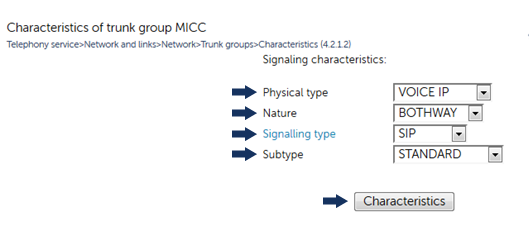
Click Characteristics and set the following values in the following characteristics fields:
| Protocol | UDP |
| Proxy n°1 | Enter the MiContact Center Enterprise Server IP address |
| - port | 5060 |
| Name management | Checked |
| Local generation of tones | Unchecked |
| On hold management | SEND ONLY |
| Re-invite without allowed SDP | Unchecked |
| Calls from | MICC |
| Transfer to | Disabled |
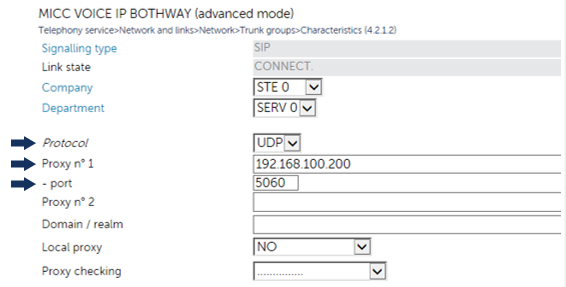
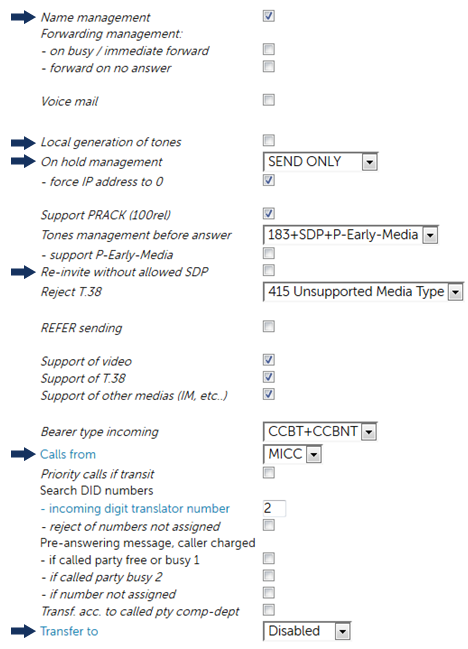
Figure 1.
Note:
Ensure to check the Update option while configuring SIP Trunk to MiCC.
↑