IDgo Use Case
This topic provides a sample use case to demonstrate how to configure a workflow using the IDgo Integration.
It is recommended to use a voice-based workflow with the IDgo Integration. The following example demonstrates how to determine whether a caller has an IDgo account. If the caller has an account, the workflow authenticates the caller and sends the information to the agent through MCX.
Figure 1. Sample IDgo Workflow
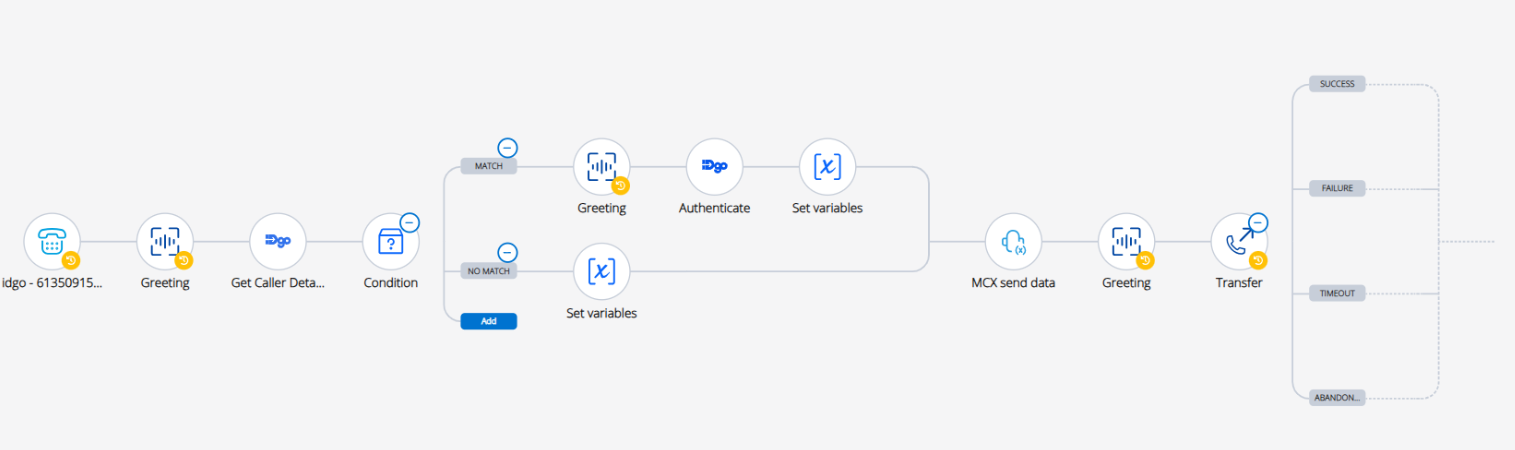
To create the sample workflow for the above-mentioned use case, perform the following steps:
- Use an Endpoint Ringing trigger.
- Add a Greeting activity to play a greeting message to the customer.
- Add the Get Caller Details activity to determine whether the caller has an IDgo account.
- Use a Condition activity to evaluate the result from the Get Caller Details activity.
- If the caller has an IDgo account, perform the following actions:
- Add another Greeting activity to inform the caller that they will receive a notification on their device.
- Use the Authenticate activity to retrieve the authentication URL.
- Use the Set Variables activity to update the correct URL value to send to the MCX agent.
- If the caller does not have an IDgo account, use the Set Variables activity to update the value to send to the MCX agent.
- Use the MCX Send Data activity to send the
ScreenpopOnRingingvariable. - Add a Greeting activity to inform the caller that they are being transferred to an agent.
- Add a Transfer activity to transfer the call to MCX agent.
↑