This Help provides:
An overview of the MiVoice Business Migration Tool
The procedure to perform a pre-migration audit of your system's database and generate a pre-migration audit report
An overview of the pre-migration audit report
The procedure to perform a migration with media replacement
The procedure to perform a full migration
Troubleshooting information
Mitel MiVoice Business 10.0
SMB Controller is added as an option in the Target Platform drop-down list.
The only operation that can performed when the target platform is SMB Controller is Pre- Migration Audit.
Mitel MiVoice Business 9.4 SP1
Enhanced the Migration with Media Replacement operation which no longer requires a software version to be entered.
Troubleshooting information has been updated with the Media Replacement and AMC returns a unhandled error messages.
Migration Tool support is limited to the following windows platforms:
Windows 8
Windows 10 Pro
Windows 10 Enterprise
Windows 10 Pro for Workstation
Windows 10 Education
Windows 11 Pro
Windows 11 Enterprise
Windows 11 Pro for Workstation
Windows 11 Education
Windows server 2012 Standard
Windows server 2012 R2 Standard
Windows server 2016 Standard
Windows server 2019 Standard
Windows server 2022 Standard
Following are the windows editions that Do Not Support the Migration Tool but can be Installed:
Windows Evaluation Editions
Windows Servers Datacenter Editions
Windows Servers Datacenter without Hyper-V
Windows Servers Essential Editions
Windows Servers Foundation Editions
NOTE:
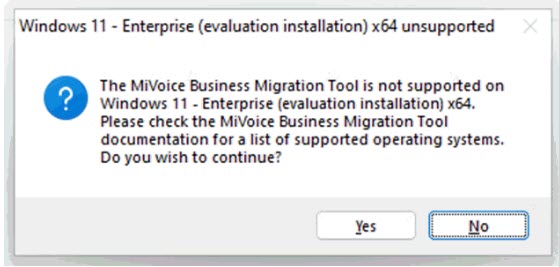
Migration Tool displays a warning message
when you install on unsupported Windows versions (editions), as shown
in the following image; The warning message indicates that Migration Tool
is not supported on the Windows platform and edition you are installing.
However, you can opt to continue with the installation.
Migration Tool 9.4 cannot be installed on the following Windows platforms:
Windows server 2003
Windows XP
Windows Vista
Windows 7
Windows server 2008
Windows Home Edition
Windows IoT Edition
Windows Mobile Edition
Windows Server 2008
Windows Server 2008 R2
Windows Servers Datacenter Core Edition
Windows Servers Datacenter Core without Hyper-V Edition
NOTE: Migration Tool 9.4 display the following
error dialog for both Fresh Install and Upgrade and abort the installation
If you select the Migration with Media Replacement, the software version used will be the pre-known Factory Media SW version for the respective platform: AX, CXii, or MXe-iii. The user cannot change the Software Version field from the UI.
Migration Tool supports The operating system (OS) Windows 11 Professional for the MiVoice Business Release 9.3.
New selectable option Extended PRG/MDUG has been added in the form Configuring License and Option Selection.
This version of the Migration Tool supports MiVoice Business Release 9.2.
Added support to migrate AX controller to MiVoice Business Release 9.1 or later. Two options are supported:
Migration: Use this option if you want the tool to perform complete migration. That is, after the bootloader migration, you must manually replace the current drive with a drive containing the MiVoice Business 9.1 or a later software. After replacing the drive, the tool proceeds with licensing the system and restoring the database.
Bootloader migration only: Use this option if you want the tool to perform only the bootloader migration. That is, after the bootloader migration, you must manually replace the current drive with a drive containing the MiVoice Business 9.1 or a later software, license the system, and restore the database.
Added support to migrate unlicensed systems that allows you to migrate:
an unlicensed system to an unlicensed MiVoice Business Release 9.0 SP3 or later
a licensed system to MiVoice Business Release 9.0 SP3 or later, excluding the database and license information.
Added a new procedure to migrate an unlicensed system to MiVoice Business Release 9.0 or later, excluding the license information. See Performing migration of an unlicensed system.
Updated the troubleshooting procedure for Failed to perform online licensing.
Added additional supported MIME types for Setting up an external repository.
Added a new procedure to fix the display issue, such as issues with text size or text that is cut off in display windows.
Added troubleshooting steps for Error 73.
This Help is intended for Mitel® certified technicians who are familiar with installing the MiVoice Business software.
It is recommended that you read the MiVoice Business Migration Guidelines document before proceeding to use the MiVoice Business Migration Tool.
Document |
Description |
Location |
MiVoice Business Migration Guidelines |
Provides guidelines for migrating your MiVoice Business system from MCD 6.0 SP3 or later to MiVoice Business Release 9.0 or later. |
|
MiVoice Business Technician's Handbook |
Provides instructions for installing, upgrading, maintaining, and troubleshooting the MiVoice Business software on the supported 3300 ICP and EX controllers, and provides the instructions for installing the MiVoice Business Migration Tool. |
|
MiVoice Business Installation and Administration Guide for Industry Standard Servers (ISS) and Virtual MiVoice Business |
Provides instructions for installing and configuring the MiVoice Business software on an Industry Standard Server (ISS), or as a software blade on a virtual appliance created with VMware. |
|
MiVoice Business System Administration Tool Help |
Provides instructions on how to program the MiVoice Business system |
Available with the MiVoice Business System Administration Tool or Document Center. |